
Download Spell by Spline – AI‑Powered 3D Image Converter
Overview of Spell by Spline
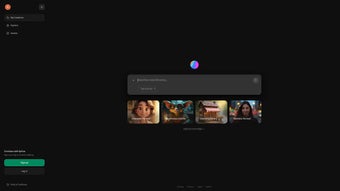
Spell by Spline is a modern, web‑based creative tool that instantly turns flat, two‑dimensional pictures into fully interactive three‑dimensional scenes. The service runs entirely in the cloud, meaning you never have to install bulky desktop software or maintain a powerful GPU on your own machine. By uploading an image, the platform’s proprietary diffusion model analyses visual cues, isolates foreground objects, estimates depth, and generates a consistent 3‑D mesh in seconds.
The result is a navigable environment that can be rotated, zoomed, and lit from any angle, delivering a level of immersion that would normally require weeks of manual modelling. Spell’s target audience ranges from freelance graphic designers who need rapid product mock‑ups to game studios looking for quick concept visualisations, educators crafting engaging lessons, and marketers who want eye‑catching interactive ads. The interface is intentionally simple: a drag‑and‑drop upload area, a real‑time preview window, and a set of intuitive controls for lighting, texture, and camera placement.
In addition to the core conversion engine, Spell provides a built‑in library of textures, HDRI lighting presets, and ready‑made 3‑D assets that can be layered onto the generated scene for added realism. Comprehensive documentation, video tutorials, and a vibrant community forum help users of any skill level achieve professional results without a steep learning curve. Security is baked into the workflow—uploads are encrypted, processed anonymously, and automatically purged after conversion, ensuring compliance with GDPR and other privacy regulations.
Whether you are looking to showcase a product, animate an educational diagram, or create a striking piece of digital art, Spell by Spline offers a seamless bridge between 2‑D imagery and immersive 3‑D storytelling.
Key Feature Set
- AI‑Driven Image‑to‑3D Conversion: A custom diffusion model creates depth‑accurate meshes directly from photos.
- Real‑Time Preview & Editing: Adjust camera angles, lighting, and material properties instantly in the browser.
- Asset Library & Presets: Access textures, HDRI environments, and ready‑made objects to enrich scenes.
- Cross‑Platform Web Interface: No download required; works on any modern browser across Windows, macOS, Linux, iOS, and Android.
- Privacy‑First Architecture: End‑to‑end encryption, automatic deletion, GDPR compliance.
- Multiple Export Options: GLTF/GLB, OBJ, USDZ for Unity, Unreal, Blender, AR platforms.
- Collaboration Tools: Share live links for teammates to view or edit without extra software.
- Extensive Documentation & Tutorials: Step‑by‑step guides, video walkthroughs, community forums.
- Free Tier & Scalable Pricing: Unlimited conversions on the free plan; paid tiers unlock higher resolution and bulk processing.
Installation & Usage Instructions
Getting Started – No Download Needed
Since Spell by Spline runs completely in the cloud, the “installation” process is simply opening a web browser. Navigate to the official website, click “Sign Up,” and create a free account using an email address or a social login (Google, Apple, or GitHub). After confirming your email, you are taken to the dashboard where you can start uploading images immediately. The platform is optimized for the latest versions of Chrome, Edge, Firefox, and Safari, so any up‑to‑date browser will provide the best experience.
Step‑by‑Step Workflow
- Upload Your Image: Drag a JPEG, PNG, or TIFF file (max 25 MB on the free tier) onto the upload zone. The system accepts high‑resolution photos up to 8 K, though larger files may take longer to process.
- AI Analysis: The AI examines the picture, identifies foreground elements, estimates a depth map, and builds a preliminary 3‑D mesh. Processing typically takes 10‑30 seconds, depending on image complexity and server load.
- Refine the Scene: Use the on‑screen toolbar to rotate, pan, and zoom. Select lighting presets or customize intensity, colour temperature, and shadows. Apply textures from the built‑in library or upload your own PNG/JPG textures for a personalized look.
- Export or Share: Once satisfied, click “Export” to download the model in GLTF, OBJ, or USDZ format. Alternatively, generate a shareable URL that opens the interactive scene in any browser, perfect for client presentations.
- Save Projects: All workspaces are automatically saved to your cloud dashboard, allowing you to revisit, edit, or re‑export at any time.
Tips for Optimal Results
- Use images with clear foreground‑background separation; the AI performs best when the subject occupies a distinct portion of the frame.
- Avoid overly busy or low‑contrast backgrounds, which can confuse depth estimation.
- Leverage the “Auto‑Cleanup” feature to remove stray artefacts after conversion.
- Experiment with different HDRI lighting presets to highlight texture details and improve realism.
- For batch processing, consider the paid “Pro” tier which allows simultaneous conversion of up to 10 images.
Because all heavy computation occurs on Spell’s remote servers, users benefit from GPU‑accelerated inference without needing a high‑end workstation. The UI provides contextual tooltips, a searchable help centre, and live chat support, ensuring that even first‑time users can achieve impressive results within minutes.
Compatibility, Pros & Cons
Spell by Spline is a browser‑based application, meaning it runs on any operating system that supports modern web standards. Tested browsers include Chrome, Edge, Firefox, and Safari on Windows 10/11, macOS Monterey and later, and major Linux distributions. Mobile browsers on iOS 15+ and Android 11+ also provide full functionality, though detailed scene editing is most comfortable on a desktop with mouse and keyboard.
Pros
- Zero‑install – works directly in the browser, removing barriers to entry.
- AI‑driven conversion produces high‑quality, multi‑view‑consistent 3‑D models.
- Multiple export formats (GLTF, OBJ, USDZ) integrate smoothly with Unity, Unreal, Blender, and AR toolkits.
- Generous free tier with unlimited conversions, ideal for students and indie creators.
- Strong privacy safeguards, end‑to‑end encryption, and GDPR compliance.
- Rich library of assets, lighting presets, and community‑generated tips.
Cons
- Performance depends on internet speed; large files may experience longer processing times.
- Advanced mesh editing (e.g., sculpting, retopology) is limited compared to dedicated desktop software.
- Some premium assets and high‑resolution exports require a paid subscription.
- Mobile editing is functional but less ergonomic than a desktop environment.
- Batch processing beyond ten simultaneous uploads is only available on higher‑tier plans.
Frequently Asked Questions
Can I use Spell by Spline offline?
No. Spell by Spline is a cloud‑based service, so an internet connection is required for both image upload and AI processing. Once you export the 3‑D model, you can work with it offline in any compatible 3‑D application.
What file formats can I export?
The platform supports GLTF/GLB, OBJ, and USDZ exports, covering most modern 3‑D pipelines, AR applications, and game engines.
Is my uploaded image stored on the server?
Images are encrypted during transfer and automatically deleted from the server after conversion is complete, in line with GDPR and privacy best practices.
Do I need a powerful computer to run Spell by Spline?
No special hardware is required. Since all heavy AI computation happens on Spell’s servers, any device capable of running a modern web browser will suffice.
Can I integrate Spell by Spline with my existing 3‑D workflow?
Absolutely. Exported models can be imported into Blender, Unity, Unreal Engine, or any other 3‑D software that supports the provided file formats, making it easy to incorporate AI‑generated assets into larger projects.
Is there a limit to how many images I can convert on the free plan?
The free tier offers unlimited conversions, but each individual file is limited to 25 MB and a maximum resolution of 8 K. Higher‑resolution uploads and bulk processing are available in the paid “Pro” and “Enterprise” plans.
Conclusion & Call to Action
Spell by Spline bridges the gap between 2‑D imagination and 3‑D reality with a frictionless, AI‑driven workflow that is both powerful and accessible. Its browser‑first design eliminates the barrier of costly installations, while the robust feature set—ranging from real‑time scene editing to high‑quality exports—caters to professionals and hobbyists alike. Privacy‑centric architecture, cross‑platform compatibility, and a generous free tier make it a compelling choice for anyone looking to quickly prototype immersive environments or enrich visual content with depth.
If you’re ready to turn static images into interactive experiences, download Spell by Spline now and start exploring the possibilities. Join the growing community of designers, educators, and developers who are already leveraging AI to accelerate their 3‑D workflows. Your next immersive scene is just a click away.



.png)



